Thursday, 29 March 2012

Revit 2013 - 3DS Max Design 2013 - Interoprability

By now you would have read what's new in Revit 2013 so I am not going to repeat what's already been highlighted elsewhere. For Revit Architecture 2013 new features you should read David's detailed analysis on his blog here.

One of my favourite enhancements in Revit 2013 is Interoperability. Autodesk has made a huge step forward in addressing Interoperability with Microstation, enhancing AutoCAD interoperability, DWF export iimprovements, IFC interoperability, and 3DS Max.

Revit 2013 and 3DS Max Design 2013 interoperability is very promising.
You can now directly link Revit files into 3DS Max Design and load selected views. You can also override material in 3DS Max and retain 3DS Max material settings/parameters when you reload Revit link file view. You can also add high level of detail to curved objects to make them smooth in 3DS Max. See following video from Autodesk.


Wednesday, 21 March 2012

NBS National BIM Library Live

NBS National BIM Library is live now! Although limited in content at the moment, it looks promising platform for the UK BIM content that is compliant with NBS/COBie etc. Stay tuned!

www.nationalbimlibrary.com


Saturday, 10 March 2012

Digital Fabrication - BIM - Interoperability (and place for IFC)

In my previous post I talked about how to take Inventor part into Revit family using .ADSK file format.

Let's look at the bigger picture of interoperability between the two, Inventor & Revit.

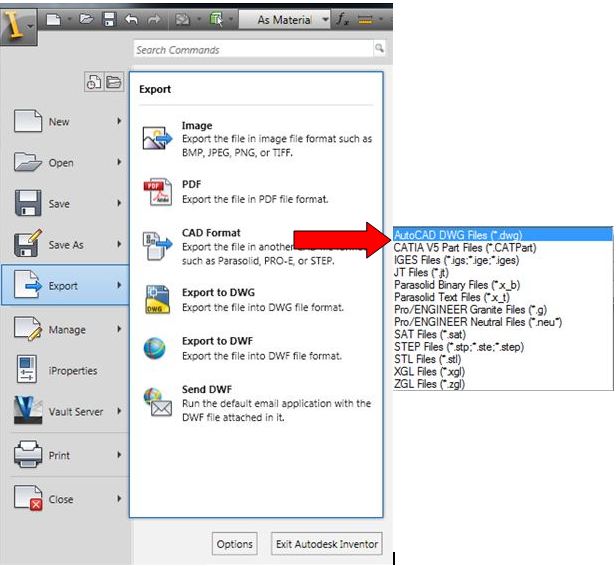
As I discussed in my previous post, ADSK is better than SAT and DWG in a way that it brings material information and some identity parameters. But how different this is from IFC file format? IFC does do this and much more than ADSK (at this moment of time!). So why invent a new file format, ADSK? Maybe AutoDeSK has answer for this. The AEC industry has been suffering a lot due to interoperability issue so why add one more file format to already complex Interoperability issue. There may be some 'technical' reason to invent ADSK file format but while other high end parametric tools such as Digital Project can export IFC files and exchange with Revit (or other BIM tools) successfully then it is difficult to fathom why ADSK? Inventor cannot even export IFC files, somebody please correct me if I am wrong. Please see image below for the possible export options from Inventor.


We are working on a project where the entire facade was modelled in Digital Project and exported as IFC and imported straight into Revit. The result is amazing. It not only brings very clean 3D geometry but also brings in material information, with no compromise to file performance. The same IFC file imports fine in Navisworks and TeklaBIMSight. Wow! you can see the BIM jigsaw puzzle pieces coming together. Next, I wish we can import IFC files into Revit family environment so that components created by manufacturers in their BIM tools can be "shrinkwrap-exported" and brought straight into family file. As tools such as Inventor, Catia, Pro E etc are widely used in manufacturing industry adopting open standard file format such as IFC for information exchange makes more sense.

Conclusion: While the other organisations such as BuildingSmart, IAI, Tekla etc are working towards open standard file format, Autodesk could help the AEC industry/community by adopting open standard file format such as IFC as their preferred file format for information exchange rather than inventing new proprietary file formats.


Inventor Part to Revit Family

Digital prototyping and Building Information Modelling are the two most hot topics in today's digital AEC industry. Autodesk has two flagship tools in these areas, Autodesk Inventor and Revit. So how do we share data between the two? Let's take a look at the possible solutions.

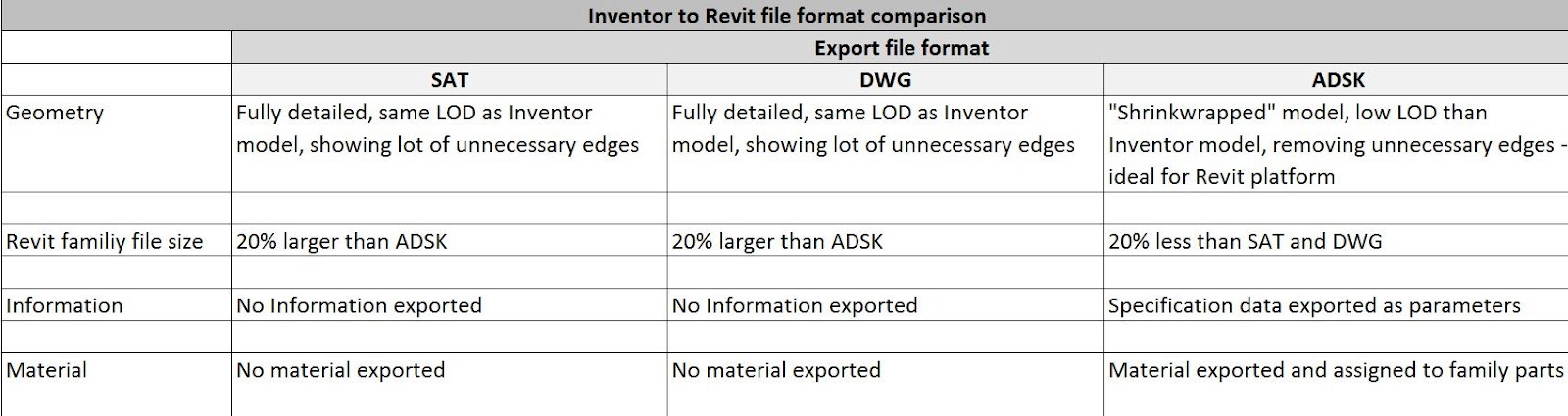
Traditionally, 3D components have been exchanged using either .SAT or .DWG file formats. Since 2010 (correct me if I am wrong) Autodesk has introduced a new file format called .ADSK.

How different .ADSK is from traditional .SAT or .DWG file formats? Lets take a look at the quick comparison matrix below.


So .ADSK seems to be better choice than .SAT or DWG file formats. Let's find out how to export .ADSK file from Inventor and use it in Revit in the following short video.


Tuesday, 28 February 2012

Tekla to Revit Interoperability - IFC or DWG?

I am sure this issue has been addressed elsewhere but I would like to highlight one typical issue you will run into if you use 3D DWG instead of IFC when exchanging information with Tekla.

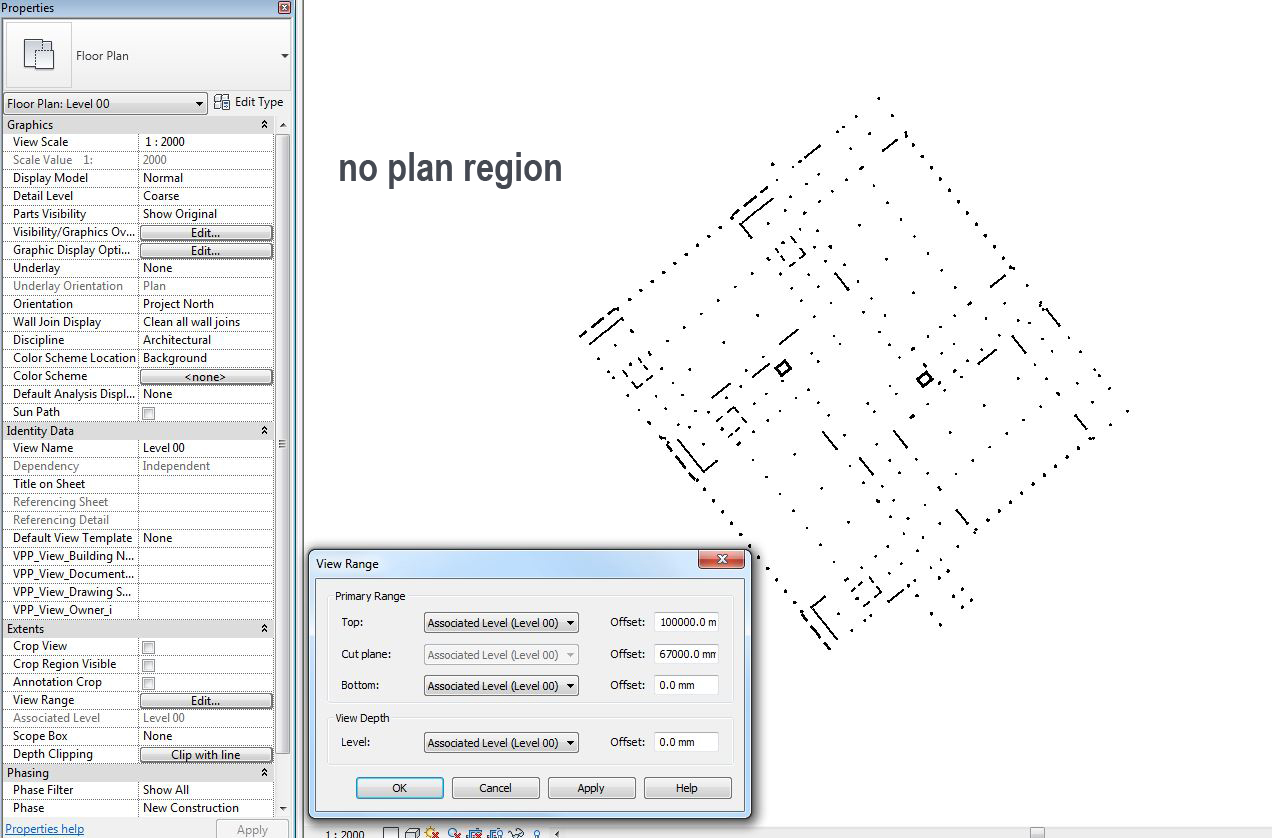
One of our users received 3D DWG export from the structural guys who are using Tekla for modelling/documentation. 3D DWG was inserted into a GM family and then loaded into a project. Everything worked fine until the user had to add some plan regions in plan views.

When you add plan region the entire GM family cuts at "A" plan region view range ignoring "View" view range. Technically this is because the entire structural model is one single 3D CAD block so it respects one view range only, whichever cuts higher.

To get around this issue use IFC file and everything works fine. Ok IFC may not be 100% perfect for a complete bIm scenario but at least for 3D collaboration point of view it is certainly 100% perfect.

More details on Tekla to Revit interoperability can be found here.


Friday, 10 February 2012

UK National BIM Report - 2012

NBS has recently published the latest National BIM Survey. Some interesting findings here. Worth a read. Well done NBS!

Highlights of the findings include:
  • 78% agree the BIM is the future of project information, though how that future will look is uncertain, with 4 out of five agreeing that the industry is not yet clear enough of what BIM actually is
  • Almost a third (31%) of construction professionals are now using BIM – up from 13% in 2010
  • Three quarters of those construction professionals currently aware of BIM predict they will be using it on some projects by the end of 2012, and almost 19 out of 20 people expect to be using it in five years' time
  • More than 80% agreed BIM increases the coordination of construction documents, with 65% of those using the technology saying BIM delivered cost efficiencies.

Wednesday, 1 February 2012

Calculate Occupancy Load and Project Parameter

I have received lot of comments regarding Calculate Occupancy Load plugin I released last week. All of the comments are very positive and encouraging. Thanks everyone who downloaded the plugin and provided valuable feedback.

I have received few comments about using this plugin with room key schedule and project parameter. In my original post and readme file I mentioned that add "Occupancy Load Factor (as area type)" and "Occupancy Load (as number type)", both as shared parameters and assign them to Room object. Actually this is partially wrong! You can use "Occupancy Load Factor (as area type & project parameter)" with Room Key Schedule and populate value for this parameter in Rooms using Room Style. I think this is the best workflow to manage "Occupancy Load Factor" per room type. Although, "Occupancy Load" must be a shared parameter in order to use it in the tags.